aCoder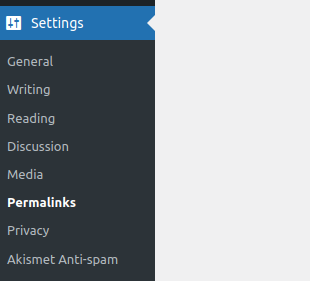
If you have moved to a new webhosting or taken a tea break only to come back and find that your wordpress site is only showing the index page, then read on.
If the index page is showing but all the other pages generate a 404 not found exception, there is hope. It is likely that the error is caused by the permalinks setting.
Log into the admin section of wordpress – you can access it at http://yoursite.com/wp-admin
From the left hand menu, select settings->permalinks
WordPress lists several different formats for structuring your URLS. These are;
- Plain
- Day and name
- Month and name
- Numeric
- Post name
- Custom Structure
Click save, without editing any of the options first. Then reload your webpage, clearing the cache.
If this does not work, have a look at the URL of the webpage you are trying to load. You might see a structure like this;
https://yoursite.com/2019/12/08/hello-world/This is the day and name format. 2019 is the year, 12 is the month and 08 is the day followed by the post name. You can try match his to the options in the permalinks. Select the relevant option, hit save and reload the page, clearing your browser cache again.